


Stainless is winding down its platform on September 1, 2026.
If you're a Stainless customer, this means the service that regenerated your SDKs when your APIs changed, along with the pipeline that published them to GitHub and package registries, is going away.
You need to replace that pipeline by migrating to a different code generator before Stainless sunsets its services.
The migration challenge
Finding an alternative generator is a twofold challenge.
First, the SDKs it produces have to be high quality: idiomatic, aligned with your organizational standards, and have sufficient OpenAPI coverage for your API.
Second, those SDKs have to be backwards-compatible. Your users already wrote code against your current SDK, and a generator that creates a radically different SDK will break it. Rename a method and every call site that uses it fails; change a return type and every caller that reads the result breaks; rename a model and every import and type annotation goes with it.
These breaking changes push the cost of the code generator migration onto your users. Below we walk through how you can minimize this migration cost.
How APIMatic helps you minimize breaking changes
APIMatic and Stainless don't produce identical output by default.
However, APIMatic's customization depth lets you shape the generated SDK to closely match your Stainless SDKs. Some differences are bridgeable with a single config change; others require a change to your OpenAPI spec; and anything the spec can't describe can be handled with custom code.
Getting there takes deliberate configuration, and the rest of this blog walks through exactly how you can make that happen with APIMatic.
What you'll get from this blog:
- An understanding of how Stainless configurations map to APIMatic configurations
- The three ways you can customize SDKs in APIMatic to match your Stainless SDKs
- Three worked examples, each showing the delta between the Stainless and APIMatic SDKs, and the exact change that bridges it
- A step-by-step Stainless to APIMatic migration checklist
The reference repository
Rather than describe APIMatic's output in the abstract, we've put a side-by-side reference on GitHub: apimatic/apimatic-stainless-sdk.
It contains generated TypeScript SDKs from both Stainless and APIMatic, along with the source inputs for each:
src/stainless-src/: the OpenAPI spec and the Stainless config (stainless.yml).src/apimatic-src/: the OpenAPI spec and the APIMatic config (APIMATIC-META.json).sdk/stainless-sdk/typescript-sdk/: the SDK Stainless generated.sdk/apimatic-sdk/typescript-sdk/: the SDK APIMatic generated.
Every customization discussed below points to real files in this repo. You can clone it, read both SDKs, diff them, and reproduce the changes yourself.
Configuration: two tools, two approaches
Before looking at the customizations themselves, it's worth understanding how the two tools store configuration, because this shapes the whole migration.
Stainless stores code generation flags, OpenApi and publishing in one file. APIMatic separates them: codegen config in APIMATIC-META.json in your repo, publishing in a Publishing Profile in the web app.
Stainless: one file for everything
Stainless keeps its configuration in a file called stainless.yml. It holds a wide range of concerns in a single file: how resources, methods, and models are grouped and named; client settings such as authentication; the license; README example snippets; and, alongside all of that, publishing infrastructure settings. Per-language targets carry package names, production repositories, and publishing flags for package registries like npm.
APIMatic: codegen config and publishing are separate concerns
APIMatic stores codegen configuration in APIMATIC-META.json, the flags and settings that control how the SDK is generated. It does not hold infrastructure: no publishing targets, no repository settings, no credentials.
Publishing lives in APIMatic's web platform instead. You configure it once through reusable Publishing Profiles; each profile stores the target GitHub repository, package metadata, and credentials. When you're ready to ship, trigger a publish from the web app or the CLI (apimatic sdk publish --profile-id=<id> --language=<lang>), and APIMatic handles the rest: generating the SDK, pushing to GitHub and package registries, and tagging the release. Credentials are stored in APIMatic's Credentials manager, not in environment variables or secrets you manage yourself.
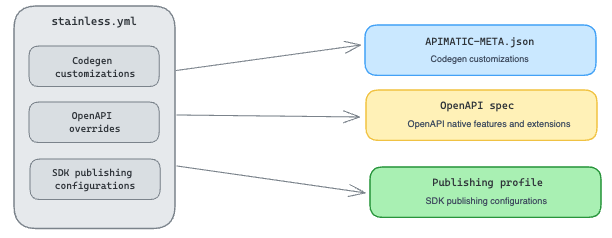 Mapping stainless.yml entries to APIMatic
APIMATIC-META.json: what it controls
The settings break into a few broad categories:
- Response shape: whether methods return the full HTTP response envelope or only the body, and error handling behavior.
- Serialization: how arrays, dates, and nulls are encoded in query strings and request bodies.
- Retries and timeouts: default timeout, retry count, and backoff configuration.
- Naming and structure: controller naming suffixes, model naming conventions, namespace organization.
- Documentation: whether to generate code examples, README content, and inline doc-comments.
- Server configuration: named environments and base URLs (the
ServerConfigurationblock covered below).
The full reference lists every available key in APIMATIC-META.json with its type and default value.
stainless.yml: where each entry goes
Moving from stainless.yml to APIMatic is not a line-by-line file translation. Each entry sorts into one of four destinations:
-
A codegen setting: it maps to a key in the APIMATIC-META.json file.
- A change to the OpenAPI spec: it belongs in the API definition itself, not in any generator config.
- Custom code: anything that cannot be replicated exactly via a codegen setting or a change to the API spec can be handled by injecting custom code into the SDK. APIMatic allows any custom code to be added to the SDK post-generation, and retains those changes on subsequent generations.
- An infrastructure concern: publishing targets, repository settings, package metadata, and credentials, which don't move into any checked-in config file at all. They move into APIMatic's web app as a Publishing Profile.
The first three are customization levers you apply per entry; the fourth, infrastructure, moves once into a Publishing Profile. Working through these four areas and using the right one for each entry makes up the bulk of the migration from Stainless to APIMatic. Below, we cover each one.
The three levers of APIMatic customization
Shaping the generated SDK comes down to three levers, each acting at a different stage of generation:
- OpenAPI definition updates: changes to the spec itself. This is the "source" stage.
- Codegen settings: configuration for how code is generated from the spec. This is the "generate" stage.
- Custom code: hand-written code merged into the generated SDK and preserved across regenerations. This is the "extend" stage.
Two of these, spec edits and codegen settings, are where most of your stainless.yml translation lands. The third, custom code injection, covers what no configuration can express. They apply in order: specs, then codegen settings, then custom code. As a rule of thumb, address a difference at the earliest stage that can express it.
The next three sections take one lever each, with a worked example from the reference repo.
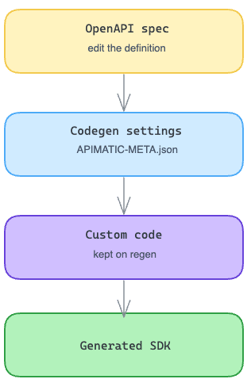 Address SDK differences at the earliest stage possible
Lever 1: OpenAPI definition updates
The OpenAPI definition is the single source of truth APIMatic generates from. Some of the things Stainless keeps in its own config file belong in the spec itself; others have a direct equivalent in APIMATIC-META.json.
The server URL is a good example.
Where Stainless keeps it: Stainless stores the API's base URL in stainless.yml, in the environments block:
# stainless.yml
environments:
  production: https://petstore3.swagger.io/api/v3
That value flows into the generated client as the default base URL. In sdk/stainless-sdk/typescript-sdk/src/client.ts, the constructor falls back to it as a hardcoded string:
const options: ClientOptions = {
apiKey,
...opts,
baseURL: baseURL || `https://petstore3.swagger.io/api/v3`,
};
So for Stainless, the base URL is a config-file concern.
Where APIMatic keeps it: APIMatic reads server URLs from the OpenAPI spec's servers block by default. In src/apimatic-src/openapi.yml:
# openapi.yml
servers:
- url: https://petstore3.swagger.io/api/v3
The migration point: In APIMatic the base URL belongs in the API definition, not in a generator config. So the environments entry from stainless.yml moves to the OpenAPI spec's servers` block.
Note: If you have multiple named environments, then in addition to the API spec, you can also use the ServerConfiguration object in APIMATIC-META.json. This gives your SDK an Environment enum so users can conveniently select the environment they want when instantiating a client.
Lever 2: Codegen settings
Codegen settings control how the SDK code is generated from the spec: return types, endpoint behavior, retries, serialization, naming, documentation, and more, across every supported language. They live in the CodeGenSettings block of APIMATIC-META.json.
Here's a worked example: how arrays in query parameters get encoded on the wire.
The Stainless SDK, by default: Stainless's stainless.yml sets array_format: comma:
query_settings:
array_format: comma
When findByTags is called with tags: ['dog', 'house-trained'], the generated SDK sends:
GET /pet/findByTags?tags=dog,house-trained
The APIMatic SDK, by default: APIMatic's default array serialization setting is set to use an indexed format, with square brackets, so findByTagssends:
GET /pet/findByTags?tags[0]=dog&tags[1]=house-trained
The delta: Same input, different wire format. Stainless flattens the array into a single comma-separated value; APIMatic emits one bracketed, numerically-indexed key per item. Whether the server parses these the same way depends on the server's query parser. Many do, some don't, and your users' existing API integrations are written against whichever format the Stainless SDK produced.
How to bridge it: The ArraySerialization codegen setting controls the format. Set it to CSV in APIMATIC-META.json, and APIMatic emits the same comma-separated format Stainless does:
{ "CodeGenSettings": { "ArraySerialization": "CSV" } }With this one line change in the metadata file, query parameters across your API match the format your existing users' integrations expect.
Lever 3: Custom code injection
The first two levers cover a lot of ground, but neither can change behavior the spec doesn't describe and no setting exposes. That's what custom code injection is for: hand-written code that becomes part of the generated SDK and is reapplied automatically every time you regenerate.
Save a customization once as a tracked change, and every future generation reapplies it. Change your spec, regenerate, and your injected code is still there.
The workflow runs locally through the APIMatic CLI. You generate once with change tracking on, add your files, then save. After that, every regeneration reapplies your customizations automatically:
apimatic sdk generate --language=typescript --track-changes

# add your custom code

apimatic sdk save-changes --language=typescript # once
# future regenerations auto-reapply your changes
The Stainless SDK, by default: Stainless automatically injects an Idempotency-Key header on every POST, PUT, and PATCH request: a UUID tied to the retry attempt (stainless-node-retry-${uuid4()}). Every mutating request gets this for free. A retried request after a network error carries the same key, so the server can detect and discard the duplicate.
The APIMatic SDK, by default: APIMatic's generated client does not inject an idempotency key by default.
The delta: Stainless treats idempotency key injection as a generator responsibility; it ships the behavior as part of the SDK. APIMatic treats it as an application responsibility; the hook is provided in the SDK, but leaves it to users to inject additional headers.
How to bridge it: Add a single file using APIMatic's addons extension point, the same hook the generator uses internally for error handlers and authentication:
// src/middleware/idempotency.ts (new file, not generated)
import type { SdkRequestBuilder } from '../clientInterface.js';
import { randomUUID } from 'node:crypto';

const MUTATING = new Set(['POST', 'PUT', 'PATCH']);

export function withIdempotencyKey(method: string): (rb: SdkRequestBuilder) => void {
 return (rb) => {
 if (MUTATING.has(method.toUpperCase())) {
 rb.header('Idempotency-Key', `node-${randomUUID()}`);
 }};
}
Register it by adding it to the addons array in the generated client.ts. This is the one edit to a generated file that the tracked-changes system is designed for:
// client.ts: one line added to the existing addons array
import { withIdempotencyKey } from './middleware/idempotency.js';

// inside createRequestHandlerFactory call:
[
  withErrorHandlers,
  withUserAgent(this._userAgent),
  withAuthenticationByDefault,
  withIdempotencyKey,   // added
]
Save this as a tracked change once, and every future apimatic sdk generate reapplies it to the freshly generated client.ts. You change the spec, regenerate, and the idempotency behavior is still there. The CLI stores each tracked change as a diff against the generated output and reapplies it after regeneration; when surrounding code shifts, it reapplies what merges cleanly and flags any change it can't place, so you review the conflict instead of losing the customization.
Using the CLI in CI: The APIMatic CLI runs headlessly in GitHub Actions or any other CI environment. Call apimatic sdk generate, the same way you would locally. Tracked customizations are reapplied automatically, so the CI output always includes your injected code
Migration checklist
Most migrations to APIMatic can be completed in under a week. Here's how you can go through the process systematically:
Phase 1: Spec preparation
- Validate your OpenAPI spec. Start with APIMatic's VS Code extension. It flags validation and lint errors inline and provides a detailed validation report. The quality of the SDK depends heavily on the spec, which is why APIMatic's validation pipeline runs over 1,000 proprietary rules that check for issues directly affecting output quality.
- Improve your spec. Use the validation output as your guide and work through the recommended changes before generating. APIMatic's VS Code extension can auto-fix a range of common issues. Run the auto-fix pass first, then address any remaining errors manually.
Phase 2: Configuration translation
- Translate stainless.yml entry by entry. For each entry, decide which of the four destinations it belongs to: a codegen setting in APIMATIC-META.json, a change to the OpenAPI spec, custom code injection, or an infrastructure concern that moves into a Publishing Profile (covered in step 4). Make the change as you classify each entry. The full settings reference is the index to work from for codegen settings. This is the bulk of the migration.
- Set up your Publishing Profile. In APIMatic's web app, create a profile with your target GitHub repository, package metadata, and credentials. This replaces the publishing flags and target configuration that lived in stainless.yml. APIMatic handles the push, so you don't need to wire up GitHub Actions or manage registry secrets yourself.
Phase 3: Customize and ship
- Generate the SDK. Run
apimatic sdk generatewith your translated configuration. - Diff and close the gaps. Compare the generated SDK against your current Stainless output, focused on the public interface: method names, return types, model and type names, parameter shapes. For each difference, use the same three customization levers from step 3 (spec, codegen settings, custom code) to close it. For anything you can't close: if it affects a method signature, return type, or model name callers reference directly, treat it as breaking and bump the major version. If it's a behavior difference callers won't observe in normal use (a changed default timeout, a header they weren't checking), ship it as a minor update.
- Publish with a changelog. Ship the migrated SDK as a new version and note any intentional interface differences so your users know what to expect.
Why APIMatic
APIMatic has been generating SDKs since 2015 and has processed more than a million OpenAPI specifications. It's a mature, enterprise-grade code generator that has been doing this one job for a decade. Teams at PayPal, Verizon, Worldpay, Maxio, and Juniper Networks use APIMatic to manage their SDK generation pipelines.
The customization depth you've seen in this post means the output from APIMatic isn't take-it-or-leave-it: you have fine-grained control over how the code is shaped, from return types to serialization behavior to injected middleware. That control is what makes a low-disruption migration possible.
Get started
The SDKs your users depend on don't have to break when Stainless winds down. If you want to take the first step towards migrating to APIMatic, submit your OpenAPI spec and Stainless config for a free migration assessment. APIMatic's engineering team will review your current setup and respond with a migration plan specific to your API. From there, a dedicated engineer will work with you through the migration.