

When your developers use AI coding assistants to integrate your APIs, the quality of that integration depends entirely on the quality of the context the AI is working from. Bad context produces code that compiles but fails in production: wrong authentication flows, outdated SDK methods, silent security vulnerabilities.
That is not a developer problem. It is an infrastructure problem. Engineering teams are currently absorbing this as review overhead, support tickets, and delayed release cycles.
Fixing it requires changing what the agent works from, not how it thinks. We ran a controlled experiment to measure exactly that. Here are the results.
Figures represent canonical results from four controlled experiments across two production-grade .NET applications. Speed and cost figures reflect overall averages; per-experiment breakdowns are in the case study.
API Integration Breaks AI Coding Agents
API coding agents are strong at generating patterns, but API integration requires contract enforcement. When operating without structured API knowledge, an agent effectively has only two tools available to complete the task.
First, it relies on its training data, which may be outdated, incomplete, or misaligned with the specific API version being integrated.
Second, it falls back to web search. Those results are noisy, inconsistent across versions, and often sanitized in ways that strip out critical code details. Code samples may be incomplete or structurally altered, forcing the agent to reconstruct missing pieces.
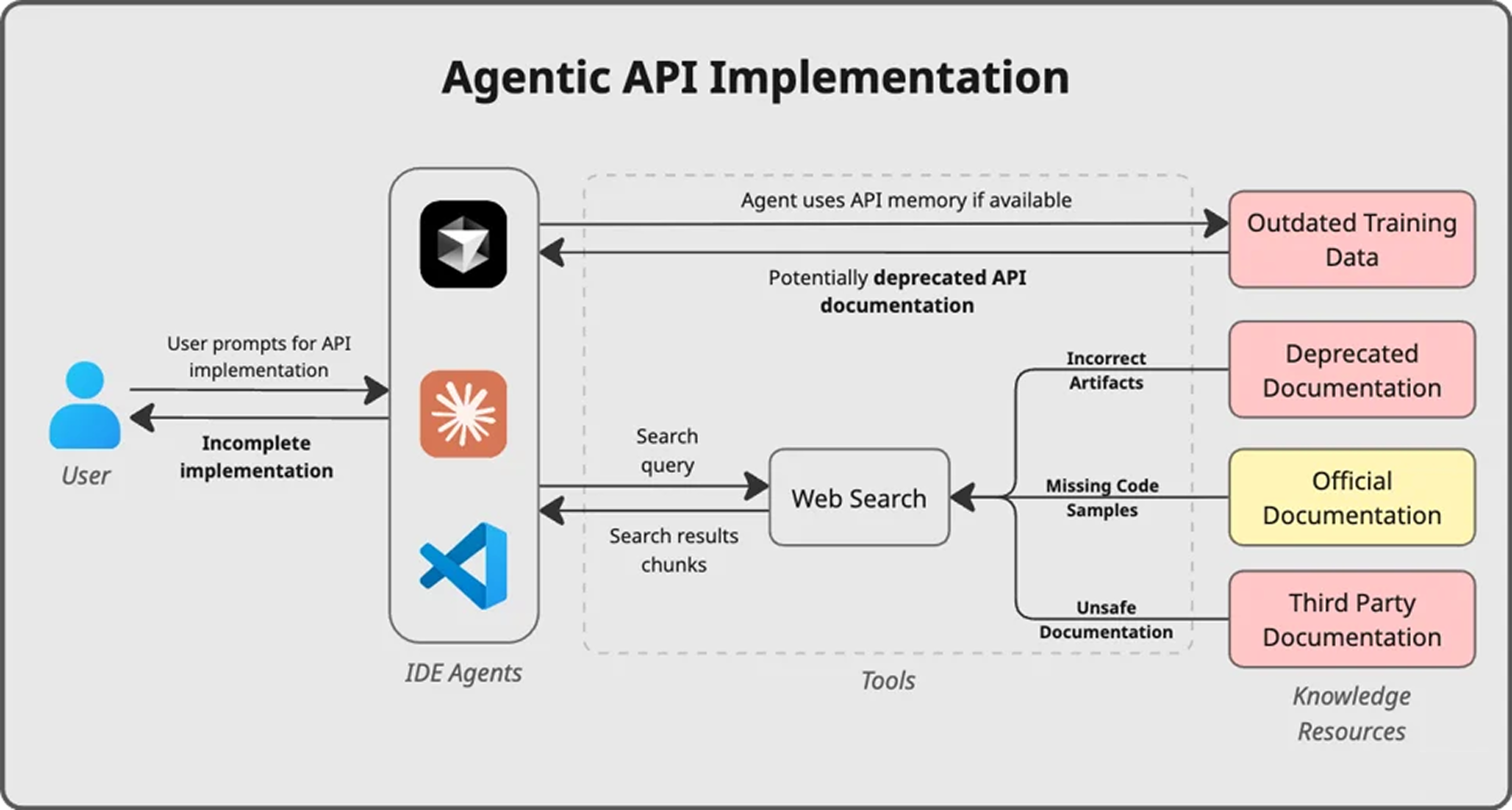
Neither of these sources guarantees fidelity to the actual API contract. As a result, the agent is forced to approximate precise definitions, and in API integration work, approximation compounds quickly.
When an agent lacks an authoritative API context, several predictable issues emerge:
- Incorrect model and method usage
- Misinterpreted authentication behavior
- Overreliance on outdated or incomplete web examples
- Not using out-of-the-box SDK features, e.g. logging, timeouts
- Silent security and workflow flaws
The result is broken builds, longer iterations, higher token consumption, and growing technical debt.
Solution: Structured API Context for Every Integration
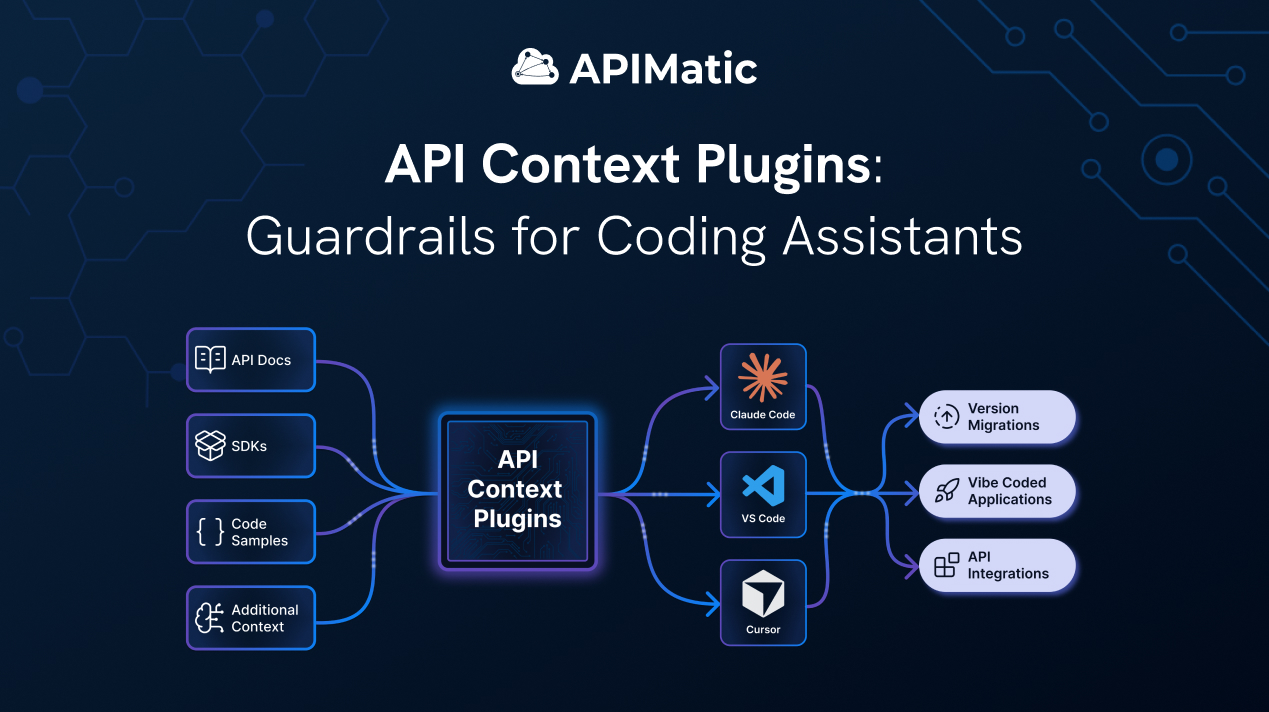
Context Plugins were built to close this gap by changing the input channel agents rely on during API integrations. Instead of inferring contracts from stale training data or noisy web search, agents receive explicit, version-aligned contracts derived directly from official specifications and SDK generation pipelines.
In an agent-only workflow, the model must implement and research simultaneously against unreliable sources. That dual responsibility increases hallucination and compounds the failures described above.
Context Plugins fix this by replacing the research layer entirely. The API knowledge is transformed into a structured, LLM-friendly representation: segmented, indexed, version-aware, and optimised for retrieval. The agent queries precise model definitions, endpoint contracts, and integration workflows in machine-consumable form. The research layer is replaced with structured retrieval. The agent implements against a defined contract instead of inferring one.
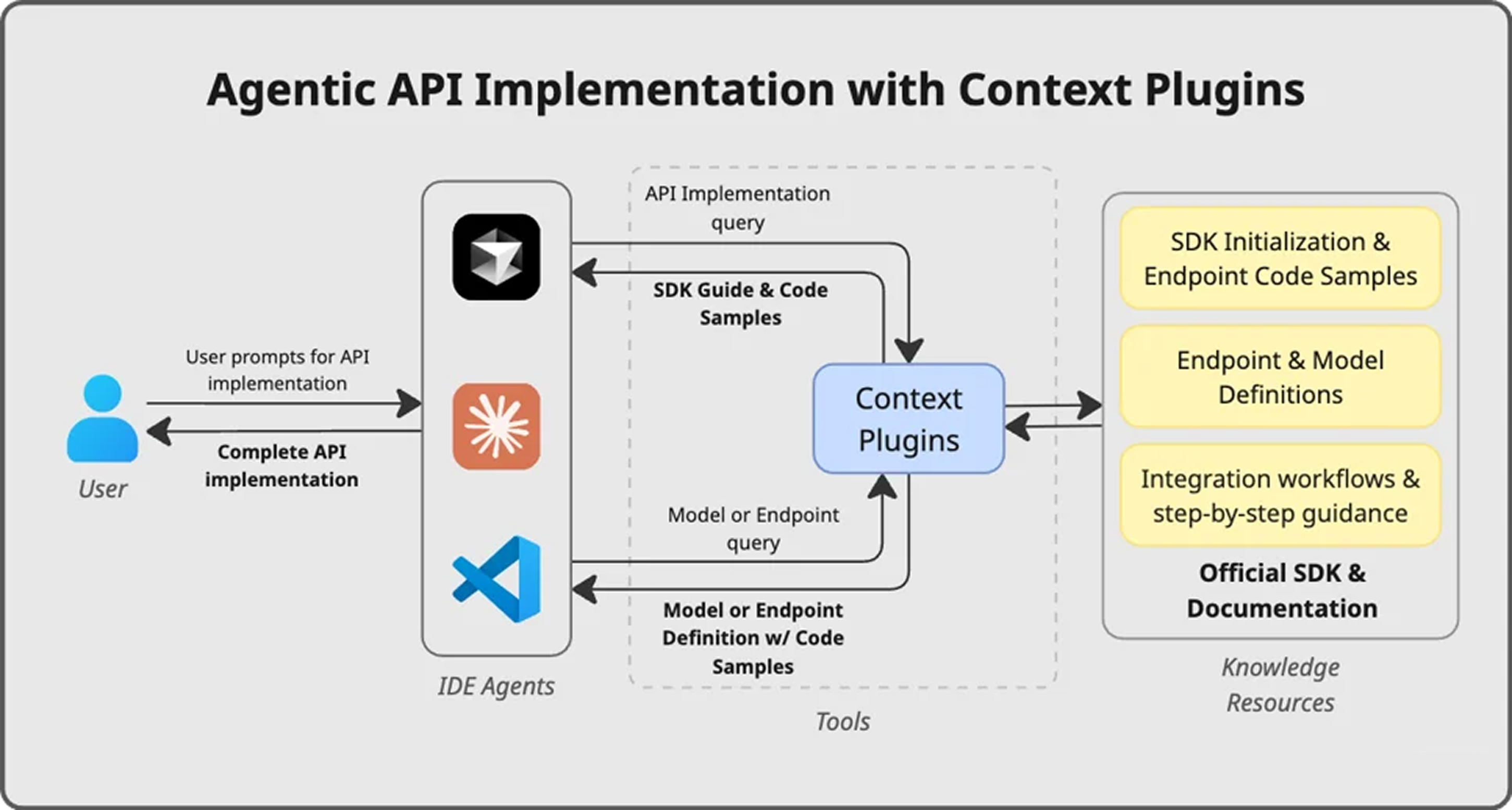
How It Works
Context Plugins run as a Model Context Protocol (MCP) server inside AI-enabled IDEs: Cursor, VS Code, and Claude Code. When a developer starts an integration task, the agent queries the plugin for API contracts rather than searching the web. The plugin returns structured, version-accurate artifacts derived from APIMatic's SDK generation engine, and keeps them current automatically, with no reinstall or manual update required.
Explicit SDK Grounding
In practice, integration starts with a single command.
To integrate the API, the developer starts their prompt with the integrate_api command. This fetches instructions that tell the agent that the user intends to use the Context Plugins to integrate the API.
This binds the task to structured API context. The agent begins with an integration outline grounded in official artifacts, including client initialization, authentication handling, configuration placement, and workflow structure. From that point forward, the agent resolves uncertainty through targeted SDK queries rather than web search. No additional manual tool invocation is required.
Structured Guidance and Contract Retrieval
During implementation, the agent relies on three targeted tools:
askfor general integration-level guidance, such as initialization, authentication, logging, and workflow structure.endpoint_searchfor exact method signatures, required parameters, and return types.model_searchfor strongly typed model definitions and nested object structures.
Each tool is critical. We noticed that agents tend to follow a certain flow when retrieving context. They will ask probing, high-level questions before diving deep into specific classes and properties. We designed the tools around this flow.
For example, the agent would initially call model_search via prompt context:
"Provide a complete minimal C# example including using statements that shows how to initialize PayPalServerSdkClient and call OrdersController.CreateOrderAsync and CaptureOrderAsync with OrderRequest and CaptureOrderInput."
It then follows up with calls to endpoint_search to figure out exactly what OrdersController.CreateOrderAsync and CaptureOrderAsync are. Similarly, it calls model_search to figure out exactly what OrderRequest and CaptureOrderInput are.
Smart, general answers followed by fast, specific lookups keep token usage low and output quality high.
The Experiment: What Changed With Authoritative SDK Context
To test whether structured SDK grounding changes agent behavior, we ran four controlled experiments across two production-grade ASP.NET systems: nopCommerce and eShop.

Each experiment involved either migrating an HTTP-based PayPal integration to the official PayPal .NET SDK (v2.0.0) or implementing a new SDK integration from scratch.
For every task, we ran the same setup twice:
- Agent only (training data + web search)
- Agent + Context Plugin (authoritative SDK grounding)
Same IDE. Same model. Same codebase. The only variable was the structured SDK context.
What We Observed
Without structured API grounding, the agent:
- Misinterpreted authentication flows
- Guessed API model structures
- Introduced architectural drift
- Required repeated manual correction
Across all four experiments, we saw:
Manual Fixes
Compile and Runtime Errors
Tokens Usage (million tokens)
Prompt Iterations
The agent-only runs produced fragile implementations that required significant manual repair. The Context Plugin runs produced deterministic, production-ready integrations that preserved architecture and SDK boundaries.
The full per-experiment breakdown, including architecture scoring, security findings, and workflow comparisons, is available in the case study.
Conclusion
When an agent integrates a real API using only training data and web search, it infers while it builds. That inference step is where errors compound. Model structures are guessed. Authentication semantics are misinterpreted. Version mismatches go unnoticed. Architectural boundaries erode.
When the same agent operates against structured, version-aligned API artifacts, its behavior changes. It retrieves the actual contracts instead of approximating them. It isolates API concerns correctly. It converges with fewer iterations and fewer corrections.
The model did not change between runs. The input channel did.
That distinction is the difference between code that looks correct and integrations that hold up in production.
If you're an API provider and want to deploy authoritative context for your developers, read more about Context Plugins or bring your own API.